
Ever open a blank document, type a title, stare at it for ten minutes, and close the tab? You're not alone because nearly every blogger hits that wall at some point. You know you have something worth saying. You just don't know how to turn it into a post that people find, read, and remember.
So what separates a blog post that sits at zero views from one that keeps bringing in organic traffic a year later? It's rarely writing talent. It's whether the post is built around what someone is genuinely searching for, structured for how people read online, and finished with the technical details that both Google and human attention spans reward.
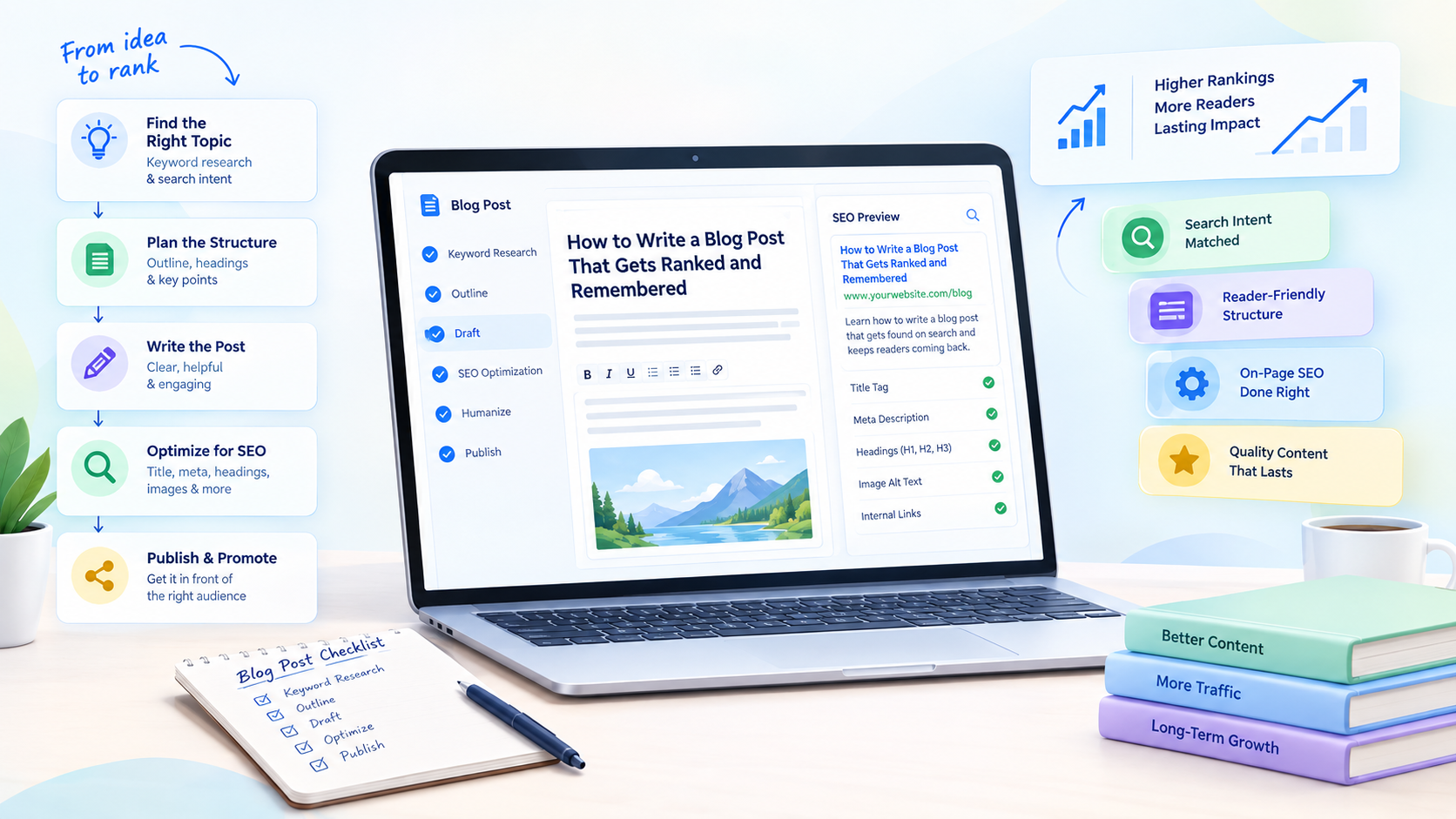
This guide covers both sides. First, the fundamentals of writing a blog post that works: how to create a blog post from idea to publish, what a solid blog post structure looks like, and the blog writing tips that separate readable content from filler. Then, a full walkthrough of how Rext AI handles the same process, from research and drafting through optimization and publishing, in one connected workflow instead of six disconnected tools.
Why Do Most Blog Posts Never Get Read?
Writing usually isn't the problem, but most people can put together clear, readable sentences. What sinks a blog post before it goes live is a handful of decisions nobody made.
- Nobody checked whether anyone is actually searching for the topic.
- Nobody matched the content format to what the searcher wants.
- Nobody structured the post so it can be scanned instead of read as a wall of text.
- Nobody covered the technical SEO basics before hitting publish.
A blog post without keyword research is a guess dressed up as content. A post without a planned blog post structure reads like a diary entry. And a post that skips on-page optimization, including the title tag, meta description, headings, and image alt text, gets buried no matter how good the sentences are.
Blog post writing, done properly, was never just writing. It's research, structure, optimization, and distribution. Most guides only teach the first one.
What Actually Makes a Blog Post Work?
Before you open any tool, answer the six questions below. If you can't answer one yet, that's where to start.
1. Who is this for?
Your target audience should be clear enough that you could describe one real reader because a post that tries to speak to everyone usually speaks to no one.
2. What does the searcher want when they type this query?
This is search intent, sometimes called reader intent, and it's the most overlooked factor in blog writing. Someone searching "how to write a copywriting post" wants steps, and someone searching "best copywriting and blogging platforms" wants a comparison. If the format and the intent don't match, good writing won't rescue the page.
3. Can someone scan the structure in ten seconds?
You need a single H1, a clean hierarchy of H2s and H3s, and short paragraphs. If a reader can't tell what the post covers from the headings alone, the structure needs work.
4. Is there proof you know the subject?
Search engines evaluate this as E-E-A-T: experience, expertise, authoritativeness, and trustworthiness. Specific detail, real sourcing, and a credible voice beat generic advice every time.
5. Have you checked the technical basics?
Title tag length, meta description, image alt text, heading order. They feel unglamorous, but they often decide whether a page lands on page one or nowhere.
6. What happens after someone finishes reading?
Every post needs a reason for the reader to do something next, whether that's subscribing, clicking through to a related article, or leaving a comment.
Keep these six questions close. Everything else here exists to help you answer them faster.
So How Does an AI platform actually speed up the blog writing process?
Many people are skeptical here, and fairly so. Plenty of "AI blog writers" generate generic text and stop, leaving you to handle the research, optimization, and publishing on your own. Rext AI takes a different route. The whole pipeline, from your first keyword to a published article, sits inside one connected workflow. If you are new, read the Let’s Start guide for account creation and concise steps. Here is how it runs.
Step 1: Set up your workspace
Once you're inside the platform, you create a workspace by entering a name and your website URL. That one step does more than it looks like. Rext AI scrapes your site and runs it through a short analysis pipeline with five stages: Website Scraping, Brand Voice Extraction, Competitor Analysis, Persona Extraction, and Finalization.
When it finishes, the platform already understands your brand's tone, who your competitors are, and who your target reader is, without you typing a single instruction. You can review and adjust anything it found before moving on, but most of the groundwork that would take a human researcher an afternoon is already done.
Step 2: Start a project and enter your keyword
From the dashboard, click "Start Fresh," then "Begin Research," and enter the keyword or topic you want the post built around.
Not sure what to type? That's common, and it's worth solving before you commit. Free tools help here. Before you open the main platform, run your rough idea through a topic generator or content idea generator to get a sharper starting point than a vague one.
Step 3: Let it research the keyword
Submit your keyword, and Rext AI runs a multi-stage research process in the background. It creates the session, normalizes search results, extracts competitor data, pulls SERP information, and analyzes backlink metrics. What comes back is keyword intent, search volume, and a difficulty score, the same data a human researcher would spend twenty or thirty minutes assembling by hand.
Step 4: Review the keyword suggestions
Alongside your original keyword, Rext AI shows related keyword opportunities from the same research pass. You can stay with your original term or switch to a stronger related one, depending on your goals.
Step 5: Choose the right content type
Does your topic need to be a blog post, or would it work better as a how-to guide, a checklist, or a comparison? Most writers never ask, and it costs them rankings.
Rext AI shows a grid of content formats: Blog, How-To Guide, Explainer, Pillar Content, Checklist, Tutorial, FAQ, White Paper, and Case Study. Each is matched to your keyword's search intent, and one is flagged as "Recommended." A how-to search wants numbered steps. A comparison search wants criteria side by side. Getting the format right is half the ranking battle, and it happens before a single sentence is written.
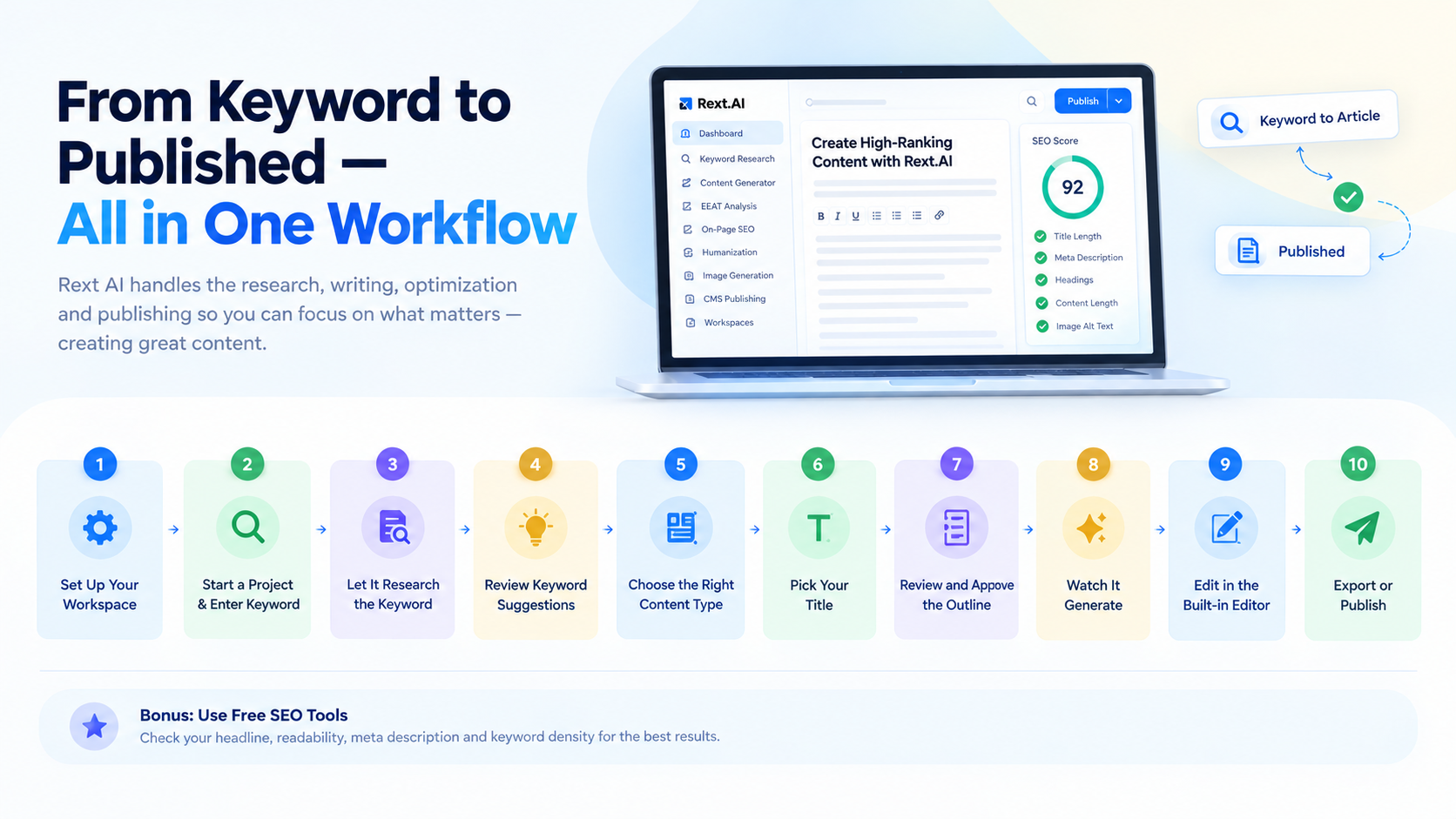
Step 6: Pick your title
Next, the platform generates several title and angle options tagged by content pillar and intent, with one marked "Recommended." You can pick one, regenerate the set, or type your own direction if none fit. If you're unsure which title has the best chance of earning a click, test it rather than guess. A free headline scoring tool is useful before you lock anything in.
Step 7: Review and approve the outline
This is where the platform's depth shows, and it's what separates it from a basic AI writer. Before generating any body content, Rext AI builds a full content brief that includes:
- Tone and audience, both editable directly.
- A focus keyphrase, plus a target word count and content schema.
- A tag list of supporting keywords to include naturally throughout.
- Keyword clusters, meaning groups of related terms organized by intent, so you can see which subtopics the article covers and why they matter.
- A section-by-section structure with bullet points describing what each part will say.
- A suggested author persona matched to the topic and search intent for E-E-A-T credibility, which you can swap or remove.
- A brand promotion block, where the platform suggests a natural, contextual mention of your business, with a relevance match score and a simple toggle to include or exclude it.
If something's off, you're not stuck with it. Type your feedback into the regenerate box and the outline rebuilds around your notes before you approve it.
Step 8: Watch it generate
After you approve the outline, the writing runs through a visible three-stage pipeline. Generating Content works from the approved outline. Humanizing smooths tone and phrasing so the piece doesn't read like obvious AI output. Reviewing Content is a final internal quality pass. A full-length article typically takes a couple of minutes here, not hours.
Step 9: Edit inside the built-in editor
This may be the most underrated part of the workflow. You land in a three-panel editor. On the left is a clickable outline so you can jump to any section. In the center is the article with a full rich-text toolbar covering headings, bold, italic, lists, quotes, links, tables, and images. On the right is a live "Performance & SEO" score out of 100, with a running checklist for title length, meta description length, mobile configuration, heading hierarchy, content length, text-to-HTML ratio, image alt text coverage, and Open Graph tags.
Make an edit and watch the score respond. You're never guessing whether a change helped or hurt.
Step 10: Export or publish
When you're happy with the piece, two sets of options sit in the top corner. You can export as HTML, Markdown, or plain text, or publish directly: Publish live, Save as Draft, Submit for Review, or Schedule for Later. If your WordPress site is connected, publishing sends the article straight to your CMS. There's no copy-pasting, no reformatting, and no re-uploading images by hand. Scheduled posting also makes it easier to keep a steady publishing schedule without logging in every time a post is due.
Do I Still Need Separate SEO Tools If I'm Using All This?
Fair question. The honest answer depends on which side of "publish" you're standing on.
Before you publish
Even a fully AI-generated draft benefits from a few checks that a content generator alone won't always flag.
- Is your title the strongest option, or just the first one you liked? A headline analyzer powered by Rext AI settles it in seconds.
- Does the draft read naturally at your audience's level? Rext AI’s readability checker shows where you land on the Flesch-Kincaid scale, so you're not relying on gut feeling.
- Will your meta description get clicked in a crowded results page? A meta description generator handles it in one pass.
- Does your keyword usage read naturally? A quick keyword density check by the Rext AI density checker tool tells you whether it drifted toward stuffing before Google's quality systems notice.
These aren't optional extras. They're the last line of defense between a solid draft and one with a small, avoidable flaw that quietly caps its performance.
After you publish
This is the part almost every beginner's guide skips, because getting a post live is only half the job.
- Will the new URL get crawled and indexed promptly? That depends on a current sitemap and a robots.txt file that isn't accidentally blocking the section you just published in.
- Is the post eligible for rich results? Star ratings and FAQ dropdowns can lift click-through rate, and they depend on proper schema markup, which most writers never think to check.
- Is anything on your site leaking SEO value through dead links? A broken link checker catches that before it turns into a slow, invisible drag on your rankings.
- How will the listing look in Google's results? A SERP preview tool lets you see it before it goes live instead of after.
The pattern is simple. Writing the post is one job. Making sure it's technically sound before publishing, and properly set up to be found afterward, are two more. They quietly decide whether all that writing effort pays off. Rext AI's free tools at rext.ai/tools cover this before-and-after gap with no account required, so they're worth bookmarking regardless of which platform you use to write the post itself.
Getting the Post Seen: Content Distribution After Publishing
A published post isn't a finished post. Even well-optimized content needs a push in its first weeks, especially on a newer site. A few habits make a real difference:
- Share it on social media in a format that fits each platform, not the same link pasted everywhere. A short takeaway or a strong stat works better than "new post is live."
- Send it to your email newsletter. Subscribers already trust you, and early clicks and engagement give a new page momentum.
- Add internal links from older, related posts to the new one, and link forward from the new post to your best existing content. It helps readers move through your site and helps search engines understand how your topics connect.
- Reply to comments. Audience engagement builds a small community around your blog, and a real conversation under a post tells readers there's a person behind it.
- Keep a publishing schedule you can sustain. Weekly or twice a month is fine. Consistency builds more long-term authority than a burst of posts followed by months of silence.
Blog content creation doesn't end at the publish button. The posts that keep bringing in organic traffic are usually the ones someone kept promoting, updating, and linking to.
What If You're Not Ready to Commit to a Full Platform Yet?
That's a reasonable place to be, and you don't need a paid tool to start writing better posts today. Open the free tools page and run your next post idea through the topic generator to sharpen the angle. Build a quick outline with the content outline generator. Once you've drafted something, check it with the readability checker and grammar checker before you publish. Each step is free, takes under a minute, and answers one of the six questions from earlier in this guide.
How Does This Compare to Just Using a Chatbot?
It's a natural instinct: why not ask ChatGPT to write the post? A general-purpose chatbot can write, but writing was never the whole job. It doesn't know your keyword's search volume or difficulty unless you tell it. It doesn't know what your competitors already cover unless you paste it in. It doesn't know your brand voice unless you re-explain it every session. And once it finishes, you're still checking on-page SEO by hand, formatting for your CMS, and copying everything into WordPress.
Rext AI's advantage isn't that the writing is dramatically different. It's that the research, brand consistency, SEO scoring, and publishing are already built into one workflow, so you're not stitching together five tools and re-explaining your business to each one.
Conclusion:
Writing a blog post that performs was never about stringing together good sentences. It's research, structure, optimization, and distribution: four jobs that most people try to squeeze into one sitting with no system behind them. Whether you handle each piece by hand or use a connected workflow like Rext AI, from automatic brand analysis and keyword research through outline approval, generation, on-page scoring, and direct publishing, the fundamentals at the start of this guide stay the same.
Frequently Asked Questions
How do you write a blog post from scratch? Start with your target audience and a clear goal, then pick a topic through keyword research. Check what already ranks on Google, build an outline with headings and subheadings, and write the introduction, body, and conclusion in that order. Finish with the title tag, meta description, internal links, and formatting before you publish. The steps in the blog writing process section above cover each stage.
How long should a blog post be? There's no universal number, and anyone quoting a fixed word count without knowing your topic is guessing. Search intent decides. A quick, specific answer may need only 700 to 1,000 words, while a competitive, broad topic often needs well over 2,000. The real test is whether you've said everything the reader needs, no more and no less.
How do I come up with blog post ideas when I'm stuck?Think back to a question you had when you were new to your niche, then write the answer you wish someone had given you. Beyond that, "People Also Ask" boxes, related searches, and questions from online communities will give you more topic ideas than you can use. A topic generator or content idea generator can speed that up.
Do I need to understand SEO to write a good blog post? You don't need to become a technical expert, but you should know the basics: what your reader is searching for, how to organize headings, and why meta descriptions and alt text matter. You can learn as you go, or lean on tools that handle the technical layer while you focus on the writing.
Will an AI-written blog post rank, or does Google penalize AI content? Search engines look at whether content is genuinely helpful and shows real expertise, not whether a person or a program wrote the first draft. Generic, shallow output struggles no matter who produced it. Content built on real keyword research, matched to the right format, and refined with a humanization pass has as much chance to rank as anything written by hand.
How often should I publish new blog posts? Consistency matters more than frequency. A rhythm you can maintain, whether weekly or twice a month, builds more authority than an intense burst followed by silence.
Do images and formatting really affect SEO? They do. Alt text helps images surface in image search and improves accessibility. Formatting choices like short paragraphs, subheadings, and bullet points affect how long people stay on the page, which search engines take into account over time.
About the Author
Sania Usman
Sania is a technical writer at Rext AI with five years of experience in writing for SaaS products and technical writing. She joined Rext AI to make technical content clear without oversimplifying it. Sania specializes in topic clusters, on-page optimization, SAAS articles, and content that answers the questions people are actually searching for.