Nobody complains about the writing part anymore because of advancements in AI, but people still complain about everything that happens after the draft is done. AI can provide drafts but cannot understand what you need to do next.
You finish an article, open WordPress, and paste it in. Suddenly your H2s are plain text, your table has collapsed into a single ugly paragraph, and the image you spent ten minutes finding didn't come with you, facing issues with internal linking as well. The most important part is to add a meta title and description, which you already wrote in your document. So after fixing SEO and readability issues, you do the meta description. Then the alt text. Then you realize the categories are wrong too.
Table Of Contents:
- An AI content tool that publishes directly to WordPress
- Where the time actually goes
- So what actually counts as "CMS integration"?
- Why one connected workflow beats five separate tools
- How to auto-publish AI content to WordPress, step by step
- Actually getting rid of manual formatting
- What separates the good CMS publishing tools from the gimmicks
- Why this matters more the bigger you get
- SEO, E-E-A-T and publishing in one workflow
- Frequently asked questions
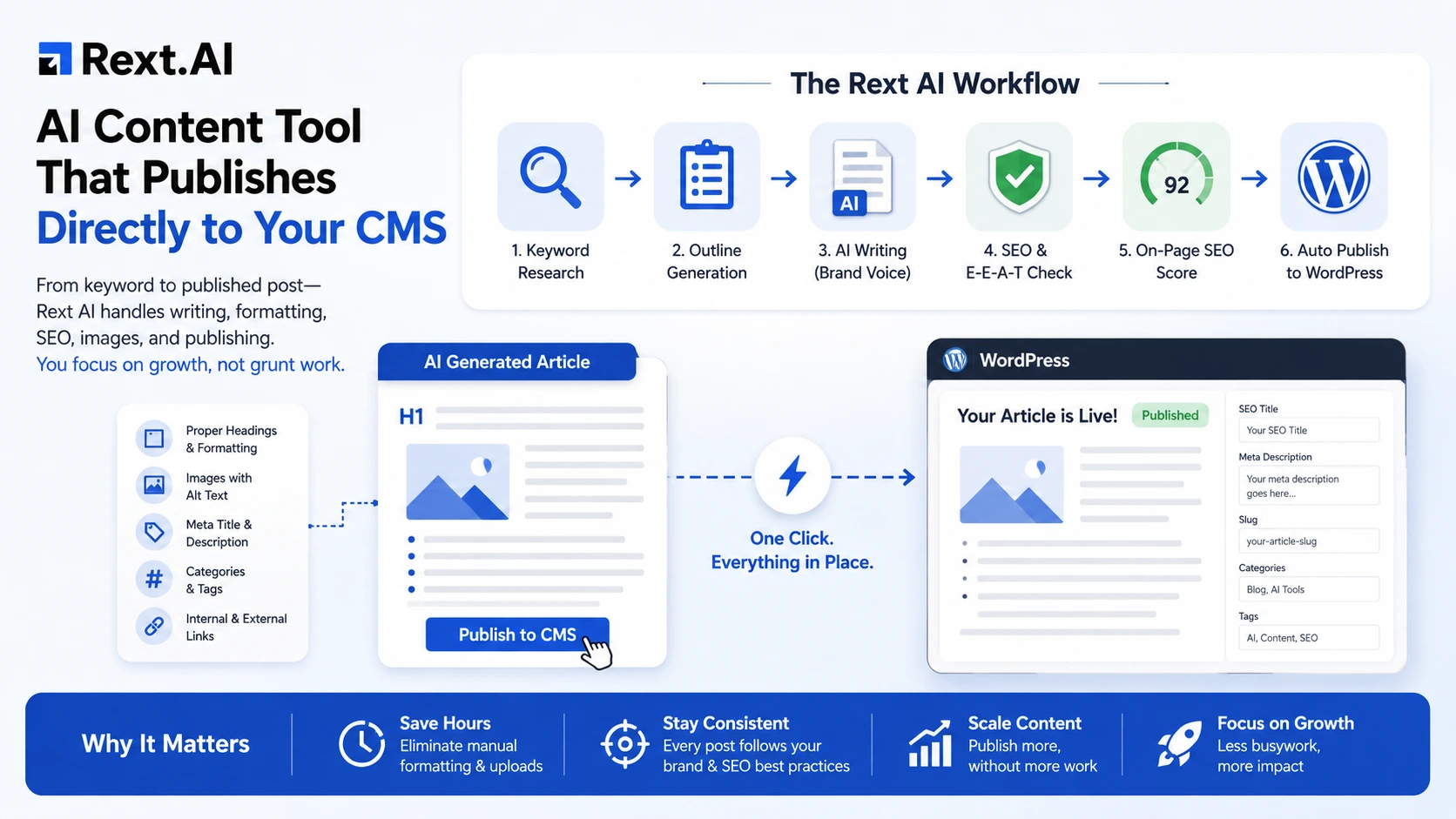
Twenty minutes to write, one hour to fix. That math never works, especially once you're publishing more than once a week. This is exactly the problem an AI content tool that publishes directly to your CMS is meant to solve. Meet Rext AI. Instead of writing being one job, editing being a second, and publishing being a separate, tedious one, these three get merged into a single motion: enter a keyword, pick the content type and title, approve the outline, and publish the finished article to WordPress, already formatted, already tagged, already carrying its featured image, and the most important part is that meta title and descriptions is automatically placed in their fields, no copy-paste in between.
Where the time actually goes
If you ask most content teams where their hours disappear, they'll say "writing and then editing." They're usually wrong because writing got fast years ago with the help of AI advancement. What's slow is the routine nobody talks about:
- Formatting the draft so headers, bold text, and bullet points survive the jump into WordPress
- Sourcing or generating an image, resizing it, uploading it, writing alt text by hand
- Filling in the meta title, meta description, and slug one field at a time
- Assigning categories and tags so the post doesn't get lost in the archive
- Re-reading everything because something always breaks in the paste
- Publishing, then starting the same routine again tomorrow.
- Adding external and internal links manually
One post a week is not hard if you do all the above tasks manually, but five posts a day across three client sites, and formatting alone starts eating hours that should be going toward strategy or actually landing new clients. Rext AI’s WordPress publishing exists specifically to remove that routine: the article shows up on your site already formatted, imaged, and tagged, without anyone touching the WordPress editor by hand.
So what actually counts as "CMS integration"?
An AI writing tool with CMS integration doesn't stop at handing you a finished draft. It connects to the site itself. For Rext AI, that is WordPress today. Shopify is coming soon. On any other CMS, copy the article as HTML, Markdown or plain text.
In practice, that looks like:
The article's structure (H1s, H2s, H3s, lists, bullet points) survives the trip without breaking. The featured image uploads straight into your media library, with its alt text. Meta titles, descriptions, and slugs are already filled in when you get there. Categories and tags land where they should, so your site doesn't turn into a pile of "Uncategorized" posts. And you decide whether it goes live immediately or sits scheduled for later.
That's really the line that separates a writing tool from a professional publishing tool. Plenty of platforms get you 80% there and leave the last, most tedious 20% to you. A finished draft sitting in a dashboard doesn't rank for anything; instead, you need an article whose on-page score and readability you've checked.
Why one connected workflow beats five separate tools
If you are a writer of your own blog or working in an agency or with different clients, a common setup I still see a lot: one tool for keyword research, another for drafting, a third for SEO scoring, Canva open in a tab for images, and then WordPress itself for the actual publishing. Every handoff between those tools is a place where something gets lost, forgotten, or takes longer than it should, and it takes too much time.
Real content workflow automation is really just about collapsing that chain into the best possible way. With Rext AI, it plays out like this: you pick the keyword, content type and title, approve the outline, and Rext AI writes the article in your brand voice with proper heading structure, checks it against E-E-A-T standards, scores it for on-page SEO, and then, when you're satisfied, pushes it straight to WordPress already formatted.
Rext AI doesn’t let you bounce between browser tabs. You're not retyping a meta description you already wrote somewhere else five minutes ago.
How to auto-publish AI content to WordPress, step by step
If your site runs on WordPress specifically, here's how the connection works with Rext AI, based on what's laid out on their WordPress Integration.
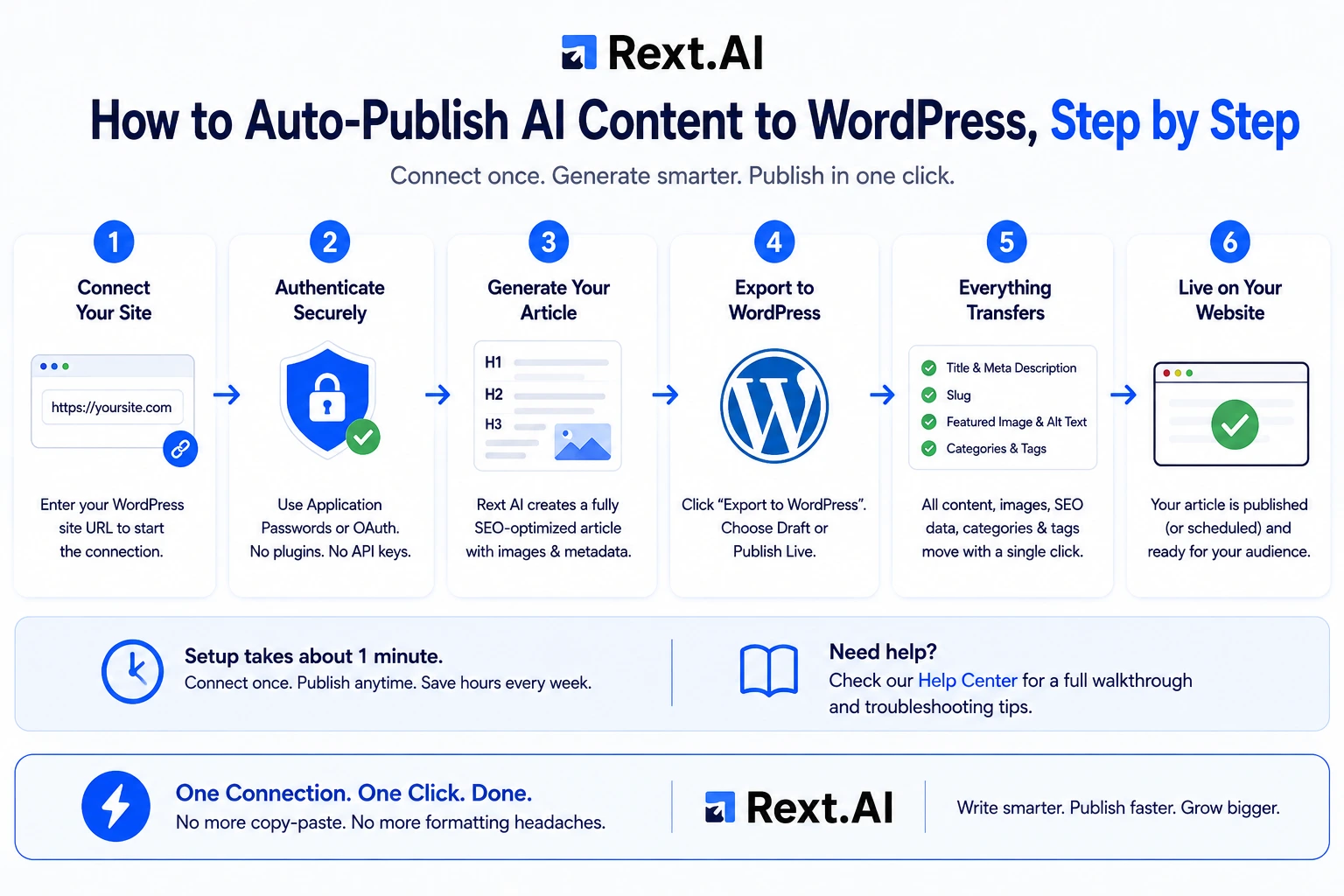
First, you install the Rext AI plugin on your WordPress site. Then you connect it with your site's address, the API key and the API endpoint; Test connection confirms it works. You're just authorizing Rext AI to post on your behalf, and you're still the one who decides what actually gets sent. Once that's connected, every finished article has a Publish menu. Send it as a draft if you want to look it over first, or push it live right away. Either way, the title, meta description, slug, featured image, alt text, categories, and tags all travel with it.
You set it up once, and after that publishing is a single click on whichever article's ready. If you want the fuller walkthrough with screenshots, Rext AI also has a dedicated guide on integration with WordPress in our Help Center.
Actually getting rid of manual formatting
Formatting is the quiet time-sink nobody puts on a content calendar. Here's what changes once it's automated, piece by piece.
Generate an article with proper H1, H2, and H3 tags, and that structure travels with it; you're not manually reapplying heading styles after pasting from a Google Doc for the hundredth time. Tables and lists stay intact too, which sounds small until you've watched a table collapse into a wall of plain text the second you paste it into WordPress. The featured image arrives with its alt text, instead of you finding, renaming and uploading one by hand. Metadata fills itself in title tags, descriptions, and slugs, so you're not typing the same information twice into two different systems. And categories and tags map on their own, so posts land where they belong without you double-checking every single time.
None of these is a huge feature by itself. Add them up, though, and that's the whole difference between publishing feeling like a chore and publishing feeling like an afterthought.
What separates the good CMS publishing tools from the gimmicks
Not every AI writer comes with a Publish button; some provide this service, but still you need manually copy pasting task.
In the name of publish, some only put plain text into WordPress draft and wait for your edits. Some skip SEO and readability score, skip alt text entirely, which quietly hurts both your SEO and your accessibility compliance. Before picking a tool, here's roughly what to check.
What to Check | Why It Matters | How Rext AI Handles It |
CMS coverage | You need support for the platform you're actually on, not just WordPress | WordPress through the Rext AI plugin; Shopify coming soon |
Formatting fidelity | Broken H2s and collapsed tables mean cleanup, which defeats the purpose | Preserves H2/H3 structure, tables, and lists as generated |
Image handling | Missing alt text hurts SEO and accessibility alike | Uploads the featured image with its alt text |
Metadata sync | Retyping meta titles twice wastes the time you just saved | Syncs title tags, meta descriptions, and slugs automatically |
Category & tag mapping | Disorganized posts weaken internal linking and site structure | Maps categories and tags to keep taxonomy consistent |
Scheduling | Agencies and niche sites often need dozens of posts queued at once | Schedule each article for a day and time, and drag it to another day in the calendar |
If a tool can't check most of these off, what you've really got is a text export with extra steps, not real CMS auto publishing.
Why this matters more the bigger you get
Manual publishing is annoying at small scale and basically unworkable once you're growing. One blog, an extra half hour of formatting per post is tolerable, if irritating. Fifteen client sites, or six niche properties that each need daily content, and that same half hour turns into a part-time job whose only output is formatted text, nothing strategic, nothing that grows the business.
This is where content scaling software earns the label. Rext AI's multi-client workspaces exist for agencies managing exactly this kind of load, so you're not hiring another writer every time you land a new client. Schedule articles on the calendar weeks ahead, and check back periodically instead of manually publishing each one.
The value isn't only speed either. It's consistency. When publishing depends on a person remembering every field, quality drifts; someone forgets alt text on a Friday afternoon; someone else skips the meta description. Automate it, and every post gets the same treatment whether it's the first of the month or the fiftieth.
SEO, E-E-A-T and publishing in one workflow
What actually separates Rext AI from others is that publishing isn't bolted onto the end as an afterthought; it's treated as the last real step of the same pipeline. The platform brings together deep keyword analysis to find topics worth writing about, E-E-A-T optimization so content actually meets the bar search engines reward, a style pass for rhythm and readability, an on-page Checklist on every article, and publishing to WordPress so the finished piece doesn't just sit in a dashboard waiting on you.
That last part is what turns "a writing tool" into an actual workflow.
If your team's still copy-pasting drafts into WordPress by hand, it might be worth seeing what a fully connected setup actually feels like. Try Rext AI and connect your WordPress site, or book a free demo if you'd rather watch the whole thing walked through first.
Frequently asked questions
What does "AI content tool that publishes directly to your CMS" actually mean?
It means the tool doesn't stop at a finished draft. It connects to your WordPress site and pushes the article straight onto it, featured image, metadata, categories, and all, without you manually moving anything over yourself.
Can I schedule a batch of posts to go live automatically over time?
Yes, one article at a time: schedule each one for a day and time, and they publish across days or weeks on their own, which helps if you're trying to keep a posting rhythm without manually hitting "publish" every day.
Will the formatting actually hold up, or will I still be fixing things after it's live?
It holds up. Headers, tables, bullet points, and the featured image carry over as generated, so you're skipping the usual cleanup that comes from pasting a doc into WordPress.
Will published content get flagged by AI detectors?
Rext AI makes no promise about AI detectors and computes no detection score; its style pass edits for rhythm and readability. No tool can promise a permanent zero score on every detector; those tools shift constantly and aren't fully reliable even on human writing. What Rext AI aims for is genuinely natural phrasing, not just gaming a checker.
Is this only useful for agencies, or does it help a solo blogger too?
Both, honestly. Agencies get more out of the multi-client workspaces, but even a single site owner saves real time by not manually formatting and publishing every post by hand.
In Rext AI WordPress integration
About the Author
Tuba Batool
Tuba Batool has spent seven years in product marketing and SaaS growth, where she learned that the best marketing sounds like a conversation, not a pitch. Now she writes for Rext AI, sharing practical lessons on SaaS growth, content strategy, and everything in between. Tuba specializes in breaking down complex marketing concepts into practical, actionable articles. She brings that same approach to every article.