
XML sitemap generator

Paste your URLs; get a valid XML sitemap with Rext.AI. No crawler to wait on, no page-count limit, nothing to install. Copy it, save it as sitemap.xml, and submit it to Search Console.

Enter one complete URL per line.

Sitemap Best Practices

  • •Save the generated file as sitemap.xml in your root directory.
  • •Submit your sitemap to Google Search Console and Bing Webmaster Tools.
  • •Update the sitemap when important pages are added or removed.
  • •Add the sitemap URL to your robots.txt file.

The basics:

WHAT IS AN XML SITEMAP GENERATOR?

XML sitemap generator

Why XML sitemap generator Matters:

XML sitemap helps in discovery because search engines find most pages by following links, and that works well for a well-linked site. It works badly for pages nobody links to a new post before it's promoted, a landing page reached only from paid ads, a deep product variant six clicks from the homepage. A sitemap gives those pages a direct route in.

What XML sitemap generator Does:

An XML sitemap generator turns a list of page URLs into the structured file search engines use as a reading list for your site. You supply the addresses. The tool wraps each one in the and tags the sitemap protocol requires, adds the namespace declaration at the top, and hands you a file that validates.

What Rext AI Provides:

Rext AI team understands that writing XML sitemap one by hand is possible. It's also miserable after about the twelfth page, and a single unescaped ampersand will invalidate the whole thing.

How it works:

HOW TO USE THE SITEMAP GENERATOR

Generate your outline
  1. 1

    Enter your domain:

    Full URL with https://. Whatever you enter becomes the base for any relative paths below.

  2. 2

    Paste your URLs, one per line:

    Full URLs or relative paths, your choice. If you're pulling from a CMS export or a crawl report, paste the whole column, duplicates and blank lines get cleaned up automatically.

  3. 3

    Cut what shouldn't be there:

    Before you generate, strip out: tag and category archives with nothing on them, paginated series pages, internal search results, thank-you pages, anything set to noindex, and any URL that redirects. A sitemap of 200 genuinely useful pages beats one with 2,000 pages of filler.

  4. 4

    Decide on lastmod:

    If your CMS tracks real modification dates, use them. If you'd be entering today's date across the board for pages you haven't touched in a year, leave the field blank. An inaccurate lastmod is worse than none, because Google learns to distrust it.

  5. 5

    Generate and check the summary:

    Look at the URL count and the validation messages. If the tool flagged skipped lines, it's usually a typo or a missing protocol.

  6. 6

    Save it as sitemap.xml:

    Exactly that filename, all lowercase. Upload it to your root directory.

  7. 7

    Point robots.txt at it:

    Add Sitemap: https://yourwebsite.com/sitemap.xml on its own line. Position doesn't matter.

  8. 8

    Submit it:

    Google Search Console → Sitemaps → paste the URL → Submit. Same idea in Bing Webmaster Tools. Come back in a few days and read the coverage report, which is where the useful information lives: how many URLs were submitted, how many were indexed, and why the rest weren't.

Examples

SITEMAP GENERATOR EXAMPLES

01 Example 1

A small business site

  • Nine pages, no blog, nothing complicated. This is the most common case by a wide margin. Input Domain: https://hillcrestroofing.com / /roof-repair /roof-replacement /gutter-installation /storm-damage /service-areas /about /reviews /contact
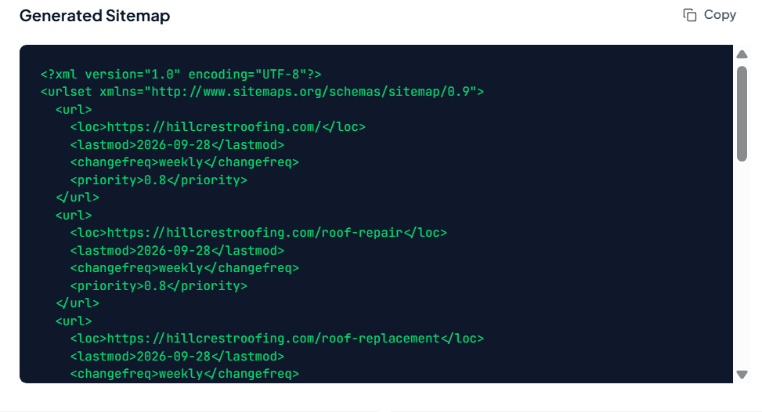
A small business site

Features

KEY FEATURES AND CAPABILITIES

No crawl, no waiting:

Crawler-based generators queue your site and email you a link twenty minutes later. This one runs the moment you paste.

No page limit:

Free sitemap tools usually cap you at 500 URLs. There's no cap here, and files over 50,000 URLs get split with an index automatically.

Valid XML, properly escaped:

Namespace declaration, UTF-8 encoding, escaped reserved characters. It passes validation without edits.

Automatic cleanup:

Duplicates removed, whitespace trimmed, malformed lines flagged rather than silently included.

Optional lastmod, changefreq and priority:

Available if your workflow needs them, off by default, with honest notes about which ones search engines actually read.

Sitemap index for large sites:

Splitting and index generation handled for you.

Runs in your browser:

Client-side, so your URL list never leaves your machine. Useful when you're working on a client site under NDA.

Free, no account:

No signup, no email capture, no credit limit.

FAQ’s:

Where do I put the sitemap file?

In your root directory, so it's reachable at yourwebsite.com/sitemap.xml. It can technically live elsewhere, but a sitemap can only list URLs from the directory it sits in or below, so the root is simplest.

Do I have to name it sitemap.xml?

 No, any filename works as long as you tell search engines where it is through robots.txt or Search Console. sitemap.xml is the convention, and crawlers check for it by default, so there's rarely a reason to use anything else.

How often should I update it?

Whenever the set of pages changes. Adding a post, retiring a product, restructuring a section: regenerate and re-upload. If you publish daily, automating it through your CMS is a better long-term answer than doing it by hand.

My sitemap is submitted, but pages still aren't indexed. Why?

A sitemap gets pages discovered. It doesn't get them indexed. If Search Console shows "Discovered, currently not indexed," the issue is usually thin content, near-duplicate pages, weak internal linking, or a crawl budget stretched across too many low-value URLs. Adding the URL again won't fix any of those.

Does a sitemap help my rankings?

 Not directly. It improves the odds of a page being found and crawled, which is a prerequisite for ranking but not a ranking factor itself.

Automate your SEO content workflow today.

Join 500+ teams using Rext AI to publish high-quality, Human-like content at scale.

Try Rext AI