
What Is a Schema Markup Generator?
Schema markup is code usually written in JSON-LD format that sits in the background of your webpage and describes its content in a language search engines can parse directly. Instead of Google guessing that a page is a recipe based on context clues, schema markup states it outright: this is a Recipe, here's the cook time, here's the ingredient list, here's the rating.
That clarity is what makes rich results possible: star ratings under a product listing, the expandable FAQ dropdown in search results, the recipe card with a photo and cook time- all of that comes from structured data, not from Google reading your page the way a person would.
A schema markup generator handles the part that trips people up: syntax. JSON-LD has strict formatting rules, and Schema.org's vocabulary includes dozens of property names that need to match exactly or the markup gets ignored. Write it by hand, and it's easy to nest a bracket wrong or misname a property. Rext AI's generator builds the structure for you based on the schema type you pick, so you fill in real content, your title, your price, your FAQ questions- and the tool handles the formatting.
How to Use the Schema Markup Generator
- Choose your schema type in the Rext AI schema markup generator: Publishing a blog post? Use Article. Selling a product? Use Product. Got a page with common questions? Use FAQ. The type determines which fields you'll need to fill in.
- Fill in the required fields: Each schema type asks for different information: Article wants a headline, author, and publish date; Product wants price, availability, and brand.
- Or paste your live URL and let the tool pull relevant details automatically, then review and adjust before generating.
- Review the real-time validation: The tool flags missing required properties before you export, so you're not finding out about an error after you've already published.
- Check your schema before proceeding further: check that your schema code is correct by testing your code on the schemavalidator.org site. If it works properly without showing any errors, then use it.
- Copy the generated JSON-LD code and paste it inside the <head> section of your page, or hand it to your developer if you're not managing the code yourself.
- Test it. Run the final markup through Google's Rich Results Test to confirm it's eligible before you consider the job done.
Schema Markup Generator Examples
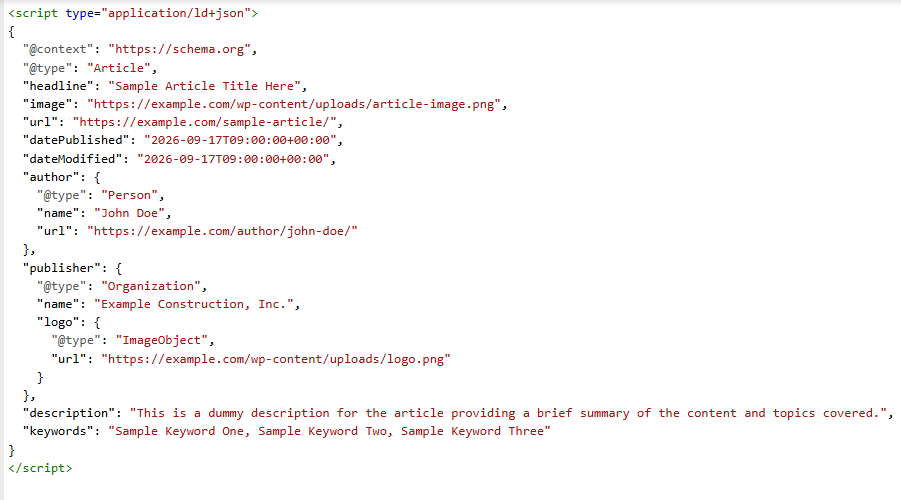
Example Article schema: A blog post generates a block with @type: Article, including headline, author name, date published, date modified, and featured image, the foundation for Google to correctly attribute and date the content.
Key Features & Capabilities
- Multiple schema types:
Article, Product, FAQ, LocalBusiness, HowTo, Review, Event, Organization, and Breadcrumb, all in one tool.
- URL auto-detection:
Paste a live page and let the tool suggest the right schema type and pre-fill fields.
- Real-time validation:
Catch missing required fields before you export, not after.
- Clean JSON-LD output:
Formatted, indented, and ready to paste directly into your <head> tag.
- Multi-schema combination:
Stack more than one schema type on a single page when your content calls for it (an Article page with an embedded FAQ, for example).
- Download or copy:
Export as a .json file or copy directly to your clipboard.
- No coding knowledge required:
Fill in form fields; the tool handles syntax.